Chapter 5
Access tables
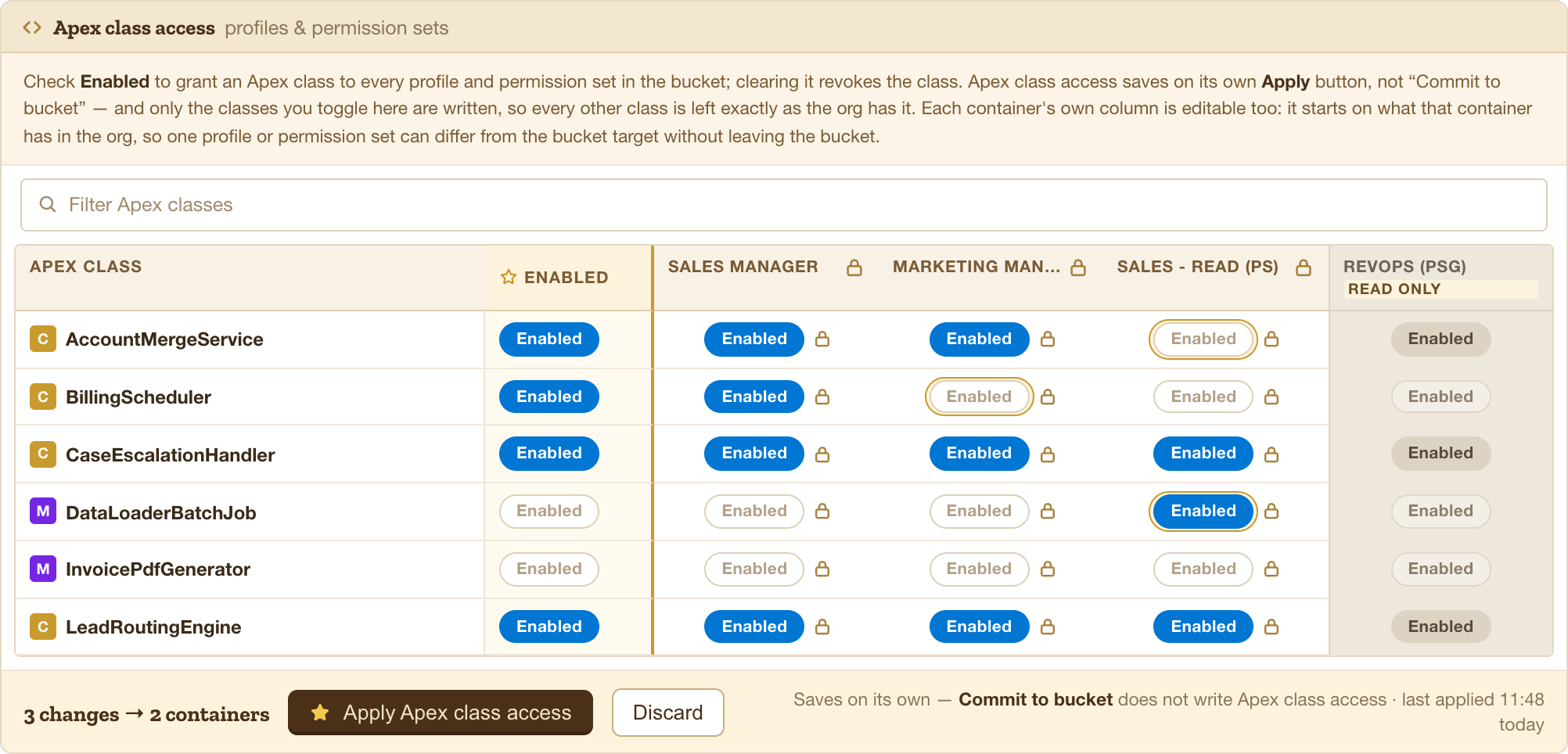
Fourteen surfaces that all work the same way: one row per item, one checkbox per container, and their own save button.
Apex classes · Visualforce pages · Flows · Custom permissions · Custom settings · Custom metadata types · Named credentials · External credentials · External data sources · Service presence statuses · Default experience site · Admin permissions
How they differ from the matrix
The matrix carries up to six settings per cell. These carry exactly one, which changes two things:
- Pills, not checkboxes. A single Enabled pill per cell, so the whole row reads at a glance.
- No promote globe. With one setting there is nothing to copy that clicking the pill would not do faster. The lock is still there — holding a container out of a change is still worth doing.
They save on their own
Access tables do not wait for Commit to bucket. Each has its own Apply button and writes immediately.
Only the items you actually toggled are written. Every other Apex class in the org keeps exactly the access it had — Buckley does not rewrite a container’s whole class list because you changed one row.
Because these save separately, a filter is not a scope. Filtering to Invoice and clicking Apply writes only the rows you toggled, not every row matching the filter.
Filtering
Each table has a search box over its own item list. The filter narrows what you see; it never changes what saves.